
If, like me, you are using Microsoft-based tools for your monitoring. It’s highly likely that you are already familiar with some aspects of Azure Monitor SCOM Managed Instance.
This project’s main objective was to take a big step toward improving cloud-based monitoring capabilities while preserving the enormous value of SCOM management packs.
The project, which was once working under the code name Aquila, has officially materialized as Azure Monitor SCOM Managed Instance and has only recently reached general availability (GA). It’s essentially Microsoft SCOM running smoothly on the cloud these days.
This integration brings forth a logical blend of SCOM monitoring capabilities and configurable health models into Azure Monitor, offering a cloud-based alternative for SCOM customers. For those undergoing the transition from on-premises to the cloud, SCOM MI serves as a critical tool, ensuring persistent monitoring across your environments.
Monitoring in Transition Phases
The transition from on-premises to the cloud brings along some unique challenges, especially in hybrid environments. While Azure Monitor provides significant capabilities, what’s often missed is the deep monitoring experience of System Center Operations Manager (SCOM), particularly for applications running within Virtual Machines. A simple lift-and-shift approach is not ideal here, because there are still maintenance costs to consider.
Azure Monitor SCOM Managed Instance steps in to close this gap, extending Azure Monitor’s capabilities by offering deep monitoring for machines hosting applications both in the cloud and on-premises.
Integration with Azure Monitor: A thorough Approach
Azure Monitor SCOM Managed Instance doesn’t just carry the Azure Monitor name, it cleverly integrates with it. This awesome integration, with ever-evolving features, keeps your existing management packs and all those years of monitoring investments intact. So, if your company has already put effort into Management Packs, or if you are keen on having those comprehensive monitoring capabilities that Azure Monitor currently lacks, then SCOM MI is just the right tool for you.
This integration opens up new ways to handle SCOM data effectively, covering everything from alerts and performance metrics to events, state, availability, and more. If you’ve invested time and resources in monitoring solutions, SCOM MI brings that much-needed depth while seamlessly working alongside Azure Monito
Managed Instance: Efficient Backend Management
The „Managed Instance“ aspect significantly reduces the workload associated with managing your SQL instances and the databases within those, your Management servers and all the updating. Microsoft manages these elements in Azure for You, offering a more organized and simplified backend for your infrastructure. This allows your Monitoring or Operations teams to redirect their time and efforts toward other more essential tasks.
In order to get a better understanding of the Big Picture we need to look at the following picture, presenting the SCOM MI Architecture Basics:
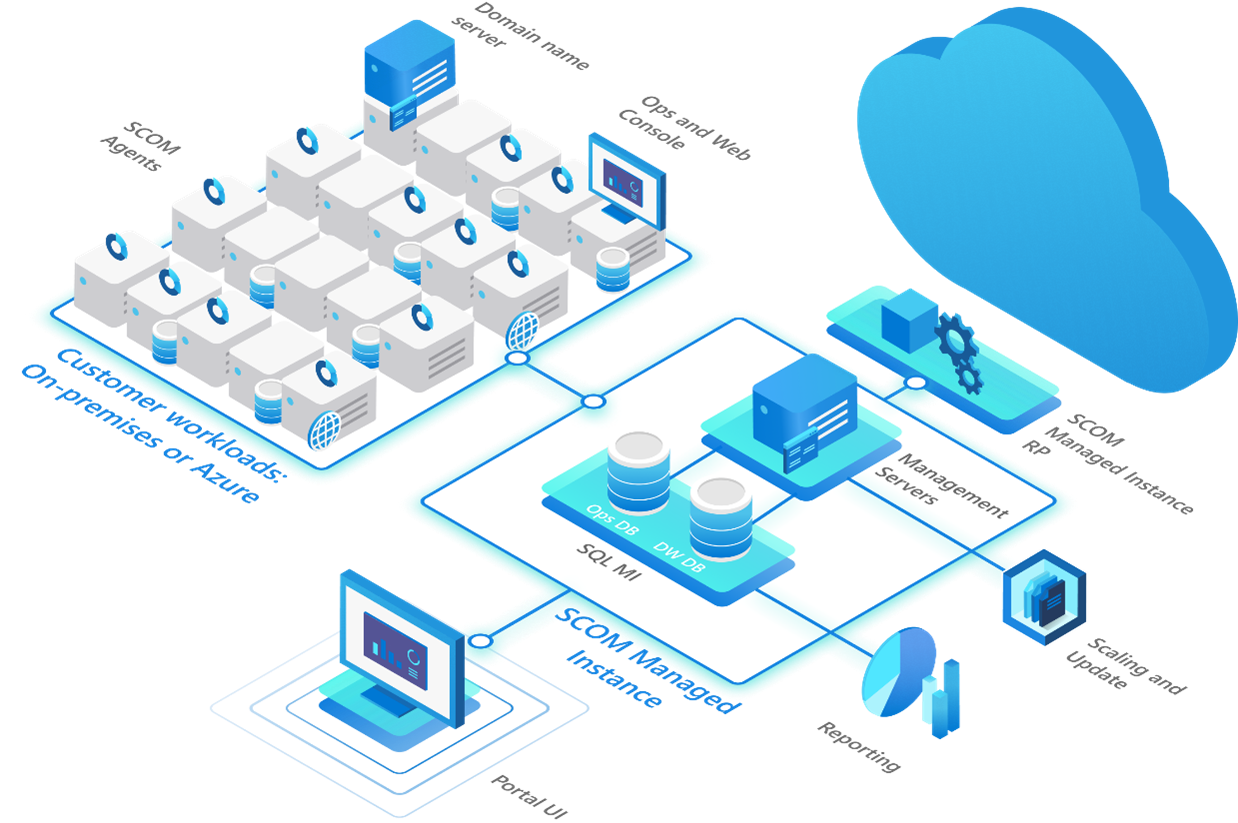
SCOM Managed Instance Architecture Overview
So let us take a close look of the main benefits of SCOM Managed Instance for You as a customer.
- Existing Investments in SCOM Management Packs
SCOM MI is compatible with existing SCOM Management Packs, allowing effortless migration of configurations and at the same time safeguarding your existing investments in SCOM. - Simplified Infrastructure Management
As a Microsoft-managed solution, SCOM MI reduces Your efforts in hardware and software management, ensuring a smoother operational experience. - Monitoring Continuity Through Migrations
SCOM MI makes moving from on-premises to the cloud simple, ensuring continuous monitoring without any interruptions. - Monitoring Workloads Everywhere
Hosted in Azure, SCOM MI provides flexibility to monitor applications both on and off Azure, ensuring thorough and complete coverage of the service.
Enhanced Capabilities
SCOM MI provides the same user-friendly experience within the SCOM Operations and Web Console, ensuring that monitoring applications with Windows agents remains consistent throughout Your organization. This reduces the necessity for significant retraining of staff.
What you end up with is Azure-based lifecycle management of your System Center Operations Manager (SCOM) setup and also maintenance-free SCOM instance management, including the SQL MI database and management servers.
What you also get in addition to this is modern Power BI reporting, replacing the SCOM data warehouse and SSRS deployment, which I personally think is a great improvement and a huge step forward towards better and more modern reporting.
SCOM Managed Instance and System Center Operations Manager share the same feature set for network monitoring so also here You will have no unexpected surprises.
SCOM Managed Instance is native to Azure and because of that you can enjoy a simplified deployment process (something we all know isn’t that simple when we are talking SCOM) and all the built-in scaling and patching features that come with Microsoft Azure.
Further Exploration and Resources
For a more comprehensive understanding and visual insights into these features here are some resources, which provide an in-depth coverage with screenshots.
Microsoft Learn
For me the two most important Microsoft Learn sources regarding SCOM Managed Instance are
- The Overview Page, which provides you with a quick service overview and presents you with the most important facts:
About Azure Monitor SCOM Managed Instance - And this particular Microsoft Learn page, which contains a very helpful table with all the links to Tutorials, Concepts, How-To Guides, Troubleshooting and Security Information, related to SCOM MI.
Azure Monitor SCOM Managed Instance
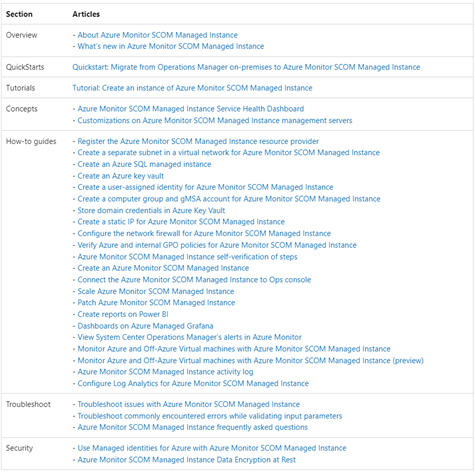
In addition to this, there are a couple of other blog articles and links, which you might find helpful:
Topqore Blog articles on SCOM MI
As always Bob Cornelissen (aka. SCOM Bob) was very active on the topic and you can learn a lot and benefit from this. Please take a look at his Blog posts on the topic here:
Azure Monitor SCOM Managed Instance opens up deep monitoring from the cloud
Azure Monitor SCOM Managed Instance – SCOM MI
Different SCOM MI related Videos
- SCOMathon May 2023
During this year’s SCOMathon there were two sessions on SCOM MI, including the Keynote of the whole event. I would really encourage everyone, interested in SCOM MI to go over the session recordings and get most of the information there:
SCOMathon 2023 Round-up
You can enjoy the following sessions on the topic:
„What comes after SCOM MI?“ – Keynote session
„Hybrid monitoring with SCOM MI and visualizing on SquaredUp dashboards“ - Microsoft Product Group Session at MP University October 2023 by Ankur Gupta, Program Manager, Microsoft
Delving into SCOM MI GA and future plans - My MP University – Inside SCOM Managed Instance Session October 2023 by Bob Cornelisen, Microsoft MVP
Exploring infrastructure pieces, installation process changes, and new features. - Introduction to features of SCOM MI (Preview) by Aakash Basavaraj, Sr. Product Manager
- And a cool overview of SCOM MI, presented by John Savill here:
Azure Monitor System Center Operations Manager (SCOM) Managed Instance
Recap
The journey from the idea of a cloud-managed SCOM to the General Availability of Azure Monitor SCOM Managed Instance has been marked by close collaboration with the Microsoft Product Group. This GA product is just the beginning, with continuous development in progress. As we express gratitude to the Microsoft Product Group for their collaboration, we (Microsoft MVPs and other community members) invite you to engage in a conversation with them. Let’s explore how this solution, among others, aligns with your vision and strategy for monitoring resources, creating value through insights and stability for your business and clients.