
A couple of weeks ago a colleague of mine approached me and asked me to help him automate a common administrative task – mirroring NTFS permissions for certain domain users. And if this sounds very general, let me depict the exact use case here.
Company A acquires Company B and recreates the user accounts from Company B’s domain to their headquarters, so that after the migration, users are allowed to use only their A-accounts (domain A) for accessing all resources. The particular challenge that needs solving is the access to all the File Servers and the folders, hosted by those, which all still reside in domain B. All the ACLs on those folders contain only the „old“ user account permissions, from the Domain B. So, in order for the users to be able to access those folders, they needs the same permissions, but granted to their new domain A accounts. The most suitable term I could think of was „mirrored permissions“. Here is also a simple graphical representation of this use case:
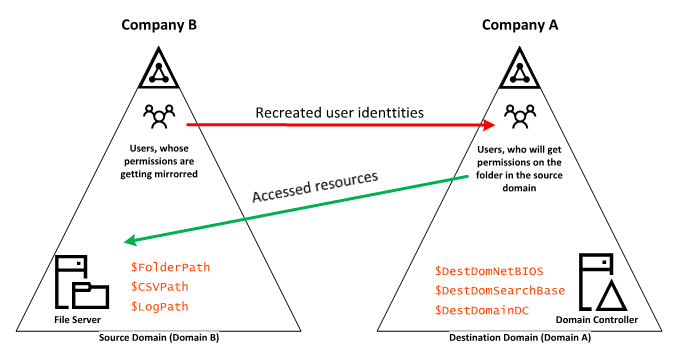
Graphical use case representation
After some digging, I found no similar PowerShell solutions out there, so decided to share what I’ve managed to put together and hope that it will be useful to someone with a similar use case. The script contains also a logging function, so that the major actions are being logged. This of course can be customized to fit your particular needs.
This being said, I got a simple CSV file, with all the users from the Source Domain (Domain B), whose folder permissions had to be mirrored. The csv had the following, very simple format:
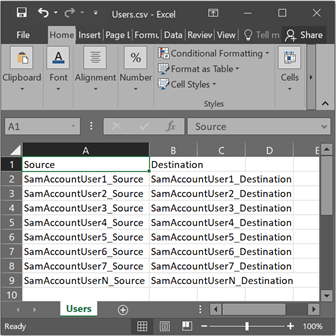
CSV File Format
So to sum it up: the actual folder permissions of the users from the Source domain need to be recreated for the same user from the destination domain. You can add as many users as you like; in our case the permissions of more than 30 users had to be mirrored.
And now to the script: I have tried putting some meaningful explanations within the script itself and also tried visually showing what values the actual variables need to take (shown on the image), but if you have questions or struggle to comprehend what the variables are for, please don’t hesitate to reach out.
[powershell]
########################################################################################################################
# Synopsis: Permission mirroring, based on a CSV file with matching SamAccountNames from 2x domains.
# Title: MirrorNTFSPermissions.ps1
# Description: The script traverses a ntfs folder path on a certian file server, located in the so called Source domain,
# exports the permissions for each folder and then mirrors the permissions only for the users located in the CSV file.
# Init Release: 23.08.2021
# Last Update: 27.10.2021
# Version: 1.0 #
##########################################################################################################################
#Set execution policy mode
Set-ExecutionPolicy -ExecutionPolicy Bypass
#Clear error
$error.clear()
#region Modules
#Import Module
Write-Log -Type INFO -Text "Importing Module Active Directory"
Import-Module ActiveDirectory
#endregion
#region Variables
$ErrorActionPreference = "Stop"
[string]$FolderPath = "C:\FolderPerm" #The root folder (and its subfolders) where permnissions will be mirrored (Source Domain)
[string]$DestDomNetBIOS = "DEST_DOMAIN" #NetBIOS name of the domain in which the targeted users reside (the users, who should get the ntfs permissions)
[string]$DestDomSearchBase = "DC=DEST_DOMAIN,DC=COM" #Destination Domain Search Base
[string]$DestDomainDC = "DomainController.dest_domain.com" #Domain Controller from the destination domain in which the target users are.
[string]$CSVPath = "C:\Users\Users.csv" #Path to the CSV file containing the two SamAccountName user columns (Source Domain)
[string]$LogPath = "C:\Logs\Logging" #Path to log file (Source Domain)
#endregion
#region Functions
function Write-Log {
[CmdletBinding()]
param
(
[ValidateSet(‚INFO‘, ‚WARNING‘, ‚ERROR‘)]
[string]$Type,
[string]$Text
)
# Set the logging path
if (!(Test-Path -Path $logPath)) {
try {
$null = New-Item -Path $logPath -ItemType Directory
Write-Verbose ("Path: ""{0}"" was created." -f $logPath)
} catch {
Write-Verbose ("Path: ""{0}"" couldn’t be created." -f $logPath)
}
} else {
Write-Verbose ("Path: ""{0}"" already exists." -f $logPath)
}
[string]$logFile = ‚{0}\{1}_{2}.log‘ -f $logPath, $(Get-Date -Format ‚yyyyMMdd‘), $LogfileName
$logEntry = ‚{0}: <{1}> <{2}> <{3}> {4}‘ -f $(Get-Date -Format dd.MM.yyyy-HH:mm:ss), $Type, $Text
Add-Content -Path $logFile -Value $logEntry
}
#endregion
#Read the users and store them
Write-Log -Type INFO -Text "Reading the Users from the CSV file"
$Users = Import-Csv -Path $CSVPath -Delimiter ","
#Create a hash table with the values (Key = Source, Value = Destination)
Write-Log -Type INFO -Text "Building a hash table to store the users"
$HashTable=@{}
foreach($row in $Users)
{
$HashTable[$row.Source]=$row.Destination
}
#Get folder structure
Write-Log -Type INFO -Text "Getting all the folders"
$Folders = Get-ChildItem -Directory -Path $FolderPath -Recurse -Force
#Traverse folders
Foreach ($Folder in $Folders) {
#Get Folder ACL
$FolderAcl = Get-Acl -Path $Folder.FullName
Write-Log -Type INFO -Text "Working on folder $($Folder.Name)"
foreach ($Access in $FolderAcl.Access) {
#Get the source user Identity
$SourceUser = $Access.IdentityReference
if ($SourceUser.Value -ne "CREATOR OWNER") {
#Get the index of the separator
$index = $SourceUser.Value.IndexOf("\")
#Trim the user
$SourceUserSAM = $SourceUser.Value.Substring($index+1)
if ($HashTable.ContainsKey($SourceUserSAM)) {
#Get the corrsponding Destination user from the hashtable
$DestUserRAW = $Hashtable.GetEnumerator() | where {$_.Key -eq $SourceUserSAM}
$DestUserSAM = $DestUserRAW.Value
Write-Log -Type INFO -Text "Working with user $($DestUserSAM)"
try {
#Get the user from the other domain
$DestUserFull = Get-ADUser -Filter {samAccountName -eq $DestUserSAM} -SearchBase $DestDomSearchBase -Server $DestDomainDC
} catch {
$ErrorMessage = $_.Exception.Message
$FailedItem = $_.Exception.ItemName
Write-Log -Type ERROR -Text "$ErrorMessage"
Write-Log -Type ERROR -Text "$FailedItem"
}
Write-Log -Type INFO -Text "Setting the permissions for user $($DestUserFull.Name)"
$FileSystemRights1 = $Access.FileSystemRights
$AccessControlType1 = $Access.AccessControlType
$IdentityReference1 = $Access.IdentityReference
$InheritanceFlags1 = $Access.InheritanceFlags
$PropagationFlags1 = $Access.PropagationFlags
try {
#Generate the access rule for the new account
$NewUserACL = New-Object -TypeName System.Security.AccessControl.FileSystemAccessRule($DestUserFull.SID,"$FileSystemRights1","$InheritanceFlags1","$PropagationFlags1","$AccessControlType1")
#Add the access rule on the current folder ACL
$FolderAcl.SetAccessRule($NewUserACL)
#Set the access rule on the current folder
Set-acl -Path $Folder.FullName -AclObject $FolderAcl
Write-Log -Type INFO -Text "Permissions on $($Folder.FullName) set"
} catch {
$ErrorMessage = $_.Exception.Message
$FailedItem = $_.Exception.ItemName
Write-Log -Type ERROR -Text "$ErrorMessage"
Write-Log -Type ERROR -Text "$FailedItem"
}
#Clear Flag Variables
Remove-Variable FileSystemRights1,AccessControlType1,IdentityReference1,InheritanceFlags1,PropagationFlags1
}
}
}
}
[/powershell]
I have published it also on my github repository here:
Stoyan Chalakov GitHub Repository (MirrorNTFSPermissions)
https://github.com/StoyanChalakov/PowerShell.MirrorNTFSPermissions
If you have optimization suggestions or have an idea how to make this script better and cooler, just ping me and I will make sure that the script gets updated!